Live Weather: Daily Forecast
- 4.3
- Rating
- 5.00M
- Installs
- Free
- Price
 Analysis by App-foxy
I usually give weather apps a short trial and then remove them when they become background clutter. Live Weather: Daily Forecast made a better first impression than most, mainly because it focuses on the thing I actually open a weather app for: checking current conditions and deciding what to do next. It is a free weather app from WINDWAVE LIMITED, rated 4.4 on average from around 8,800 ratings, and it has passed the early-adoption stage with over one million installs.
That popularity does not automatically make it a keeper, though. Weather apps live or die by repeated usefulness. A polished first check is easy; earning a place on my phone after several weeks is harder. After using it as a daily forecast tool, I see a clear audience for it, along with a few reasons some people may prefer their phone’s built-in weather service or a more specialized alternative.
From an appealing first check to a useful daily habit
The first-week appeal is straightforward. I can open Live Weather: Daily Forecast, look at the current situation, and quickly decide whether I need a jacket, an umbrella, or a change of plans. That speed matters more to me than decorative weather graphics. When I am leaving home in a hurry, I do not want to dig through several screens before finding the information that affects the next few hours.
You May Also Like

 Blood Strike: 2.5 Anniversary
Blood Strike’s Loadouts Turn Every Drop Into a Tactical Gamble
A close look at Blood Strike’s custom loadouts: how fast access to signature weapons reshapes its battle royale rhythm, rewards preparation, and narrows the gap between fights.

 Pandora - Music & Podcasts
Pandora’s Music Is Easy to Start, but Harder to Recover
Pandora’s strength is its low-effort path from a seed to a station. Its weak spot is how much confidence it asks you to place in connection, setup, and quiet recovery.

 8 Ball Pool
 Is Built on Rivalries, Rematches, and Routine
A close look at the rivalries, rematches, shared routines, and unanswered safety questions that turn a quick pool match into a persistent mobile community.

 Samsung Music
’s Quiet Strength Is Playing What You Already Own
Its reach comes less from spectacle than from dependable access to a personal library. That simplicity is both the app’s strongest retention engine and its ceiling.

 AccuWeather: Weather Radar
AccuWeather Review: A Quick, Clear Forecast for Everyday Decisions
For everyday plans, the best forecast is the one you can understand quickly. AccuWeather makes rain timing, radar, and local conditions easy to act on, with a few trade-offs.

 Hill Climb Racing
Why Hill Climb Racing Still Turns Crashes Into One More Run
A tiny car, a bumpy hill and one more upgrade: Hill Climb Racing keeps resurfacing because its simple chaos makes every near-miss feel personal.
More From Our News Desk



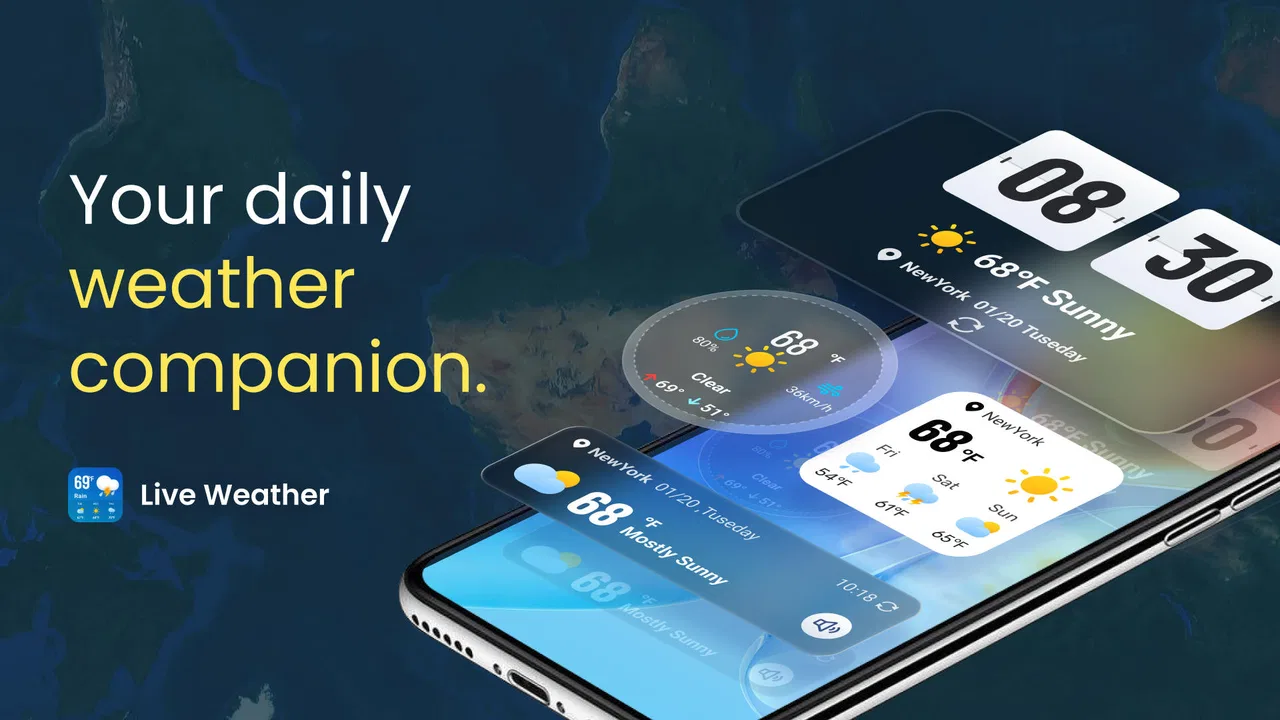
The app’s short store description is simply “Live Weather,” and that concise positioning matches the way I experienced it. It is not trying to present itself as a specialized storm-monitoring workstation or a planning suite for professional outdoor work. Its natural role is the everyday forecast companion: open it in the morning, check again before commuting, and return to it when the sky looks different from the forecast.
One realistic routine is checking the app before taking a child to school, then opening it again before the afternoon trip home. The first check helps with clothing and transport; the second helps decide whether outdoor plans still make sense. That repeated, small decision-making is where the app has more value than a one-time novelty. I found it most useful when I treated it as a quick checkpoint rather than something to study for long periods.
The free price makes that trial easy. I do not have to commit money before discovering whether the presentation suits me or whether the forecasts are useful in my area. The app is also rated for Everyone, which makes it a reasonable choice for a shared household device or for someone who wants a simple weather tool without an intimidating specialist interface.
There is a practical detail worth remembering before installing it: the current version is 1.2.25 and it supports Android 7.0 or later. That gives it broad compatibility with older Android phones, although I would still keep the app updated when updates are available. Weather information is only useful when the app remains dependable, and an outdated installation is an unnecessary source of friction.
During the first week, I would recommend testing it at the moments that matter to you rather than judging it from a single sunny morning. Check it before work, before a walk, and when rain is expected. Weather presentation can feel excellent in calm conditions but become less convincing when conditions change quickly. A short personal trial gives a much fairer impression than simply admiring the opening screen.
What makes the first week feel worthwhile
The strongest early benefit is reduced effort. I do not need a complicated routine to get something useful from it. A quick glance can support decisions about commuting, errands, exercise, and travel between nearby places. That makes the app especially suitable for people who want a dedicated weather shortcut but do not need a deep meteorological tool.
I also like the idea of using it as a second opinion when the built-in weather widget feels too limited. The default service on a phone is convenient, but convenience can sometimes mean accepting a cramped layout or a forecast that is difficult to scan. Live Weather: Daily Forecast gives the weather its own space, which can make a short check feel more deliberate and readable.
My advice is to avoid turning the first week into a hunt for every possible setting. Start with the locations and checks you genuinely use. If the app helps you make decisions faster, it is already doing its main job. If you find yourself opening it only to browse changing visuals, the novelty may not survive beyond the first few days.
Month-to-month value depends on routine, not novelty
After the initial curiosity fades, the important question becomes whether the app continues to solve a recurring problem. In my experience, its long-term value comes from repetition: the same morning check, the same pre-commute glance, and the same confirmation before outdoor plans. That sounds modest, but weather information is a modest need for most people. An app does not have to entertain me if it consistently saves uncertainty.
Live Weather: Daily Forecast works best for users whose decisions are local and immediate. If I am deciding whether to walk, cycle, carry laundry outside, or leave earlier, I need accessible current conditions and a forecast I can understand quickly. For those situations, a dedicated app can become part of a useful habit without demanding much attention.
A less obvious use is comparing expectation with reality over time. I can check the forecast before leaving, then compare it with what I actually encounter. That does not turn the app into a scientific instrument, but it helps me learn how much confidence I should place in its guidance for my own routine. A forecast that feels useful for morning commuting may not be enough for planning a full-day hike, and recognizing that boundary is part of using it responsibly.
Another useful workflow is checking the app at two separate decision points instead of repeatedly refreshing it. I would look once when making a plan and once shortly before acting on it. That reduces needless screen time while still allowing for changes. It is a small habit, but it prevents the app from becoming a source of constant checking and anxiety.
The app is less compelling for people who need detailed weather analysis, highly specialized alerts, or tools built around a particular profession. A gardener, sailor, photographer, or outdoor worker may want information and controls designed specifically for those activities. In those cases, a specialist service can be a better long-term choice even if Live Weather: Daily Forecast feels cleaner for ordinary daily use.
It is also not the ideal replacement for official emergency information during dangerous weather. For serious storms or local hazards, I would use authoritative warnings in addition to any general weather app. A convenient forecast is helpful for ordinary planning, but it should not be my only source when safety decisions are involved.
Where it fits beside familiar alternatives
The usual alternative is the weather widget already on an Android phone. That option wins on convenience because it requires no extra installation and is often visible before I open anything. Live Weather: Daily Forecast has to justify its place by making the dedicated check clearer or more satisfying. If the built-in widget already gives you everything you need, the extra app may feel unnecessary.
Compared with a general search engine’s weather panel, a dedicated app encourages a repeatable routine. I do not have to start a new search each time. That is a small advantage, but repeated small advantages are what determine whether a utility earns lasting space on a phone.
Compared with specialist weather services, the trade-off goes the other way. A general daily app is easier to approach, while a specialist tool may offer more depth for a particular activity. I would choose Live Weather: Daily Forecast for ordinary planning and a more focused service when the consequences of a forecast are higher or the activity demands greater detail.
The app’s average rating of 4.4 suggests that many users find its overall experience satisfying, but I would not treat that number as a guarantee for every location or routine. Weather usefulness is personal. The same interface can feel perfectly adequate to someone checking a commute and too limited to someone planning outdoor work several hours away.
Maintenance is light, but paid extras change the calculation
One reason weather apps often survive on my phone is that they require very little maintenance. I do not need to create content, manage a library, or build a complicated profile. The main responsibility is simply remembering to keep the app current and checking whether it remains useful in the places I care about.
That low maintenance burden is a genuine strength. Once I know where to look, the app can become part of a morning routine without taking over my day. I would rather use a weather app for a few seconds than spend time configuring it every week. This is where Live Weather: Daily Forecast has a good chance of remaining useful after the first month.
Still, “low maintenance” does not mean “no maintenance.” Forecast habits can become stale. I might continue checking the app out of routine even when the information no longer affects my plans. A monthly reset helps: remove locations I no longer care about, reconsider whether the app is still faster than the built-in option, and decide whether I am using it for decisions rather than decoration.
The free installation is helpful, but in-app purchases range from $2.99 to $49.99 per item. That is a wide span, so I would pay attention to what is offered before buying anything. My own standard for a weather subscription or upgrade is simple: it should remove a recurring annoyance or add information I genuinely use. If it only makes the app feel more elaborate, I would keep the free experience and avoid turning a basic utility into an unnecessary expense.
This payment structure also affects who should skip the app. Someone looking for a completely free, no-compromise weather experience may prefer the phone’s included service. Someone comfortable paying for a richer weather workflow may be better served by an established specialist app whose advanced tools are central to its identity. Live Weather: Daily Forecast makes the most sense for people who want to start free and decide later whether additional value exists for their routine.
I would also avoid judging the app solely by how often I open it. Weather information is naturally intermittent. During a stable week, I may only need one quick check each morning. That is not a failure; it is the correct level of use for a low-drama forecast tool. The real test is whether it is available and understandable when conditions become relevant.
Small habits that improve the experience
First, I would check the app before committing to an outdoor plan and again shortly before leaving, rather than relying on an early glance for the entire day. This is particularly useful when the plan involves several hours outside. It keeps the app in its proper role: a planning aid, not a promise.
Second, I would use it alongside common sense. If the sky is already dark, wind is increasing, or local conditions clearly disagree with a general forecast, I would adjust the plan instead of defending the screen’s prediction. This is an important trade-off with any everyday weather app: convenience improves decisions, but it does not replace observation.
Third, I would review paid options only after the free version has become part of my routine. The first week is too early to know whether an extra purchase will matter. After a month, I can identify the exact friction I want to solve. If I cannot name that friction, I would not spend more.
What can create fatigue over time
The main source of fatigue is repetition without new value. If every opening gives me the same kind of quick glance and I rarely make different decisions from it, the app may gradually feel interchangeable with the built-in widget. That is not a serious flaw in the app so much as a reminder that weather utilities have a narrow job.
Another possible frustration is the gap between a general forecast and local reality. Weather can vary noticeably across short distances, especially around hills, coastlines, dense urban areas, and open countryside. If your plans depend on precise conditions at a specific location, a simple daily app may leave you wanting more context. I would not blame the interface for every mismatch, but I would recognize the limitation before relying on it for demanding activities.
Paid prompts can also affect the feeling of a free app. I prefer to decide when a utility deserves money after I understand its everyday value. If purchasing becomes part of every check, the app can feel less like a calm tool and more like a sales surface. The presence of in-app purchases means this is something I would watch during longer use, especially if I only need basic forecasting.
There is also a psychological fatigue that comes from checking weather too often. A live forecast can encourage repeated refreshing when the plan is uncertain. My solution is to define the decision first: what am I checking, and what will I do differently? If the answer is nothing, I close the app. That habit keeps the tool useful instead of letting it become another source of distraction.
For families, the Everyone age rating is reassuring, but it does not mean every user needs the same amount of information. A child checking whether to take a coat needs a clear answer; an adult organizing a long outdoor event may need more detailed planning support. The app is strongest when expectations match that everyday level of use.
One further consideration is device age. Support for Android 7.0 or later is generous, but older hardware can still shape how pleasant any modern app feels. If the phone is already slow or short on storage, I would compare the app’s practical benefit with the simplicity of using the existing weather widget. Compatibility gets the app installed; it does not guarantee that it will be the most comfortable option on every device.
My long-term verdict after the novelty fades
I see Live Weather: Daily Forecast as a sensible everyday weather app rather than a complete weather command center. Its lasting value comes from being easy to revisit for ordinary decisions: leaving home, commuting, walking, exercising, or checking whether plans need a backup. That is enough for many people, and the free entry point makes it easy to test without much risk.
I would recommend it to someone who wants a dedicated weather screen, prefers a quick daily routine, and does not need specialized forecasting tools. It is also a reasonable choice for an older Android phone because the minimum operating system is Android 7.0. The developer, WINDWAVE LIMITED, has positioned the product around accessible live weather information, and that straightforward purpose is where it makes the most sense.
I would skip it if the built-in weather widget already answers every question I ask, if I need professional-level detail, or if I want a weather app with no possibility of paid extras. I would also avoid depending on it alone for dangerous conditions or high-consequence outdoor decisions. In those situations, official alerts and a more specialized service deserve priority.
The app earns lasting space when I use it as a small, repeatable decision tool rather than an app I browse for entertainment. My preferred routine is one check when planning the day, one check before an important outdoor departure, and no unnecessary refreshing between those moments. That pattern keeps the maintenance burden low and makes the free version easier to judge fairly.
After the first month, I would ask myself three practical questions: does it open quickly enough for my routine, do I understand the forecast without extra effort, and has it helped me make better plans? If the answer is yes, keeping it installed is justified. If the answer is no, the default phone service may be the cleaner choice.
Overall, Live Weather: Daily Forecast is most convincing as a calm, accessible companion for everyday weather checks. It does not need to become the most advanced weather tool on the phone to be worthwhile. Its success depends on whether its quick information fits your habits, whether its paid options feel optional rather than necessary, and whether you know when a general forecast is not enough.
For me, that makes it a qualified recommendation: useful for daily planning, easy to try, and light to maintain, but not a universal replacement for built-in weather tools, official warnings, or specialist services. The best reason to keep it is not the first-week novelty, but the small decisions it can simplify every day.
FAQs for Live Weather: Daily Forecast
01What features does Live Weather: Daily Forecast offer?
Live Weather: Daily Forecast provides real-time weather updates, detailed daily forecasts, and severe weather alerts. Users can view hourly predictions, track weather patterns on interactive maps, and access data on temperature, humidity, wind speed, and UV index. The app also offers customizable notifications and widgets for quick access to weather conditions.
02Is Live Weather: Daily Forecast free to use?
Live Weather: Daily Forecast is available as a free download, but it may offer in-app purchases. These purchases typically unlock premium features like ad-free experiences, advanced forecasting tools, or additional map layers. Users can enjoy the basic functionality without any cost, but opting for premium features enhances the app’s utility.
03How accurate is the weather information provided by the app?
The app sources its data from reputable meteorological services, utilizing advanced algorithms to ensure accuracy. While no weather forecast can be 100% precise, Live Weather: Daily Forecast is known for its reliable predictions and timely updates. Users can generally trust the app for making informed decisions based on weather conditions.
04Does Live Weather: Daily Forecast work offline?
Live Weather: Daily Forecast primarily requires an internet connection to update its data. However, the app may store recent weather information for offline access. Users can view previously downloaded forecasts when offline, but for the most current updates, an active internet connection is necessary.
05Can I customize the weather alerts in the app?
Yes, Live Weather: Daily Forecast allows users to customize weather alerts to suit their needs. Users can set notifications for specific conditions like temperature changes, rain, snow, or severe weather warnings. This customization ensures that users receive only the alerts that are most relevant to their preferences and location.
Pros
- Accurate real-time weather updates.
- User-friendly interface with easy navigation.
- Detailed forecasts for multiple locations.
- Customizable alerts for severe weather.
- Interactive radar maps with high precision.
Cons
- Ads can be intrusive at times.
- Limited offline functionality.
- Some features need premium access.
- Occasional slow loading of radar maps.
- Requires constant internet connection.

Live Weather: Daily Forecast
Gallery